 hmoban
 Python利用Selenium模拟浏览器自动操作

![Python利用Selenium模拟浏览器自动操作[Python常见问题]](https://www.zixueka.com/wp-content/uploads/2023/10/1696831116-96c8fd087d55a5b.jpg)
概述
在进行网站爬取数据的时候,会发现很多网站都进行了反爬虫的处理,如JS加密,Ajax加密,反Debug等方法,通过请求获取数据和页面展示的内容完全不同,这时候就用到Selenium技术,来模拟浏览器的操作,然后获取数据。本文以一个简单的小例子,简述Python搭配Tkinter和Selenium进行浏览器的模拟操作,仅供学习分享使用,如有不足之处,还请指正。
什么是Selenium?
Selenium 是一个用于Web应用程序测试的工具,Selenium测试直接运行在浏览器中,就像真正的用户在操作一样。支持的浏览器包括IE(7, 8, 9, 10, 11),Mozilla Firefox,Safari,Google Chrome,Opera等。Selenium支持多种操作系统,如Windows、Linux、IOS等,如果需要支持Android,则需要特殊的selenium,本文主要以IE11浏览器为例。
安装Selenium
通过pip install selenium 进行安装即可,如果速度慢,则可以使用国内的镜像进行安装。
涉及知识点
程序虽小,除了需要掌握的Html ,JavaScript,CSS等基础知识外,本例涉及的Python相关知识点还是蛮多的,具体如下:
- Selenium相关:
- Selenium进行元素定位,主要有ID,Name,ClassName,Css Selector,Partial LinkText,LinkText,XPath,TagName等8种方式。
- Selenium获取单一元素(如:find_element_by_xpath)和获取元素数组(如:find_elements_by_xpath)两种方式。
- Selenium元素定位后,可以给元素进行赋值和取值,或者进行相应的事件操作(如:click)。
- 线程(Thread)相关:
- 为了防止前台页面卡主,本文用到了线程进行后台操作,如果要定义一个新的线程,只需要定义一个类并继承threading.Thread,然后重写run方法即可。
- 在使用线程的过程中,为了保证线程的同步,本例用到了线程锁,如:threading.Lock()。
- 队列(queue)相关:
- 本例将Selenium执行的过程信息,保存到对列中,并通过线程输出到页面显示。queue默认先进先出方式。
- 对列通过put进行压栈,通过get进行出栈。通过qsize()用于获取当前对列元素个数。
- 日志(logging.Logger)相关:
- 为了保存Selenium执行过程中的日志,本例用到了日志模块,为Pyhton自带的模块,不需要额外安装。
- Python的日志共六种级别,分别是:NOTSET,DEBUG,INFO,WARN,ERROR,FATAL,CRITICAL。
示例效果图
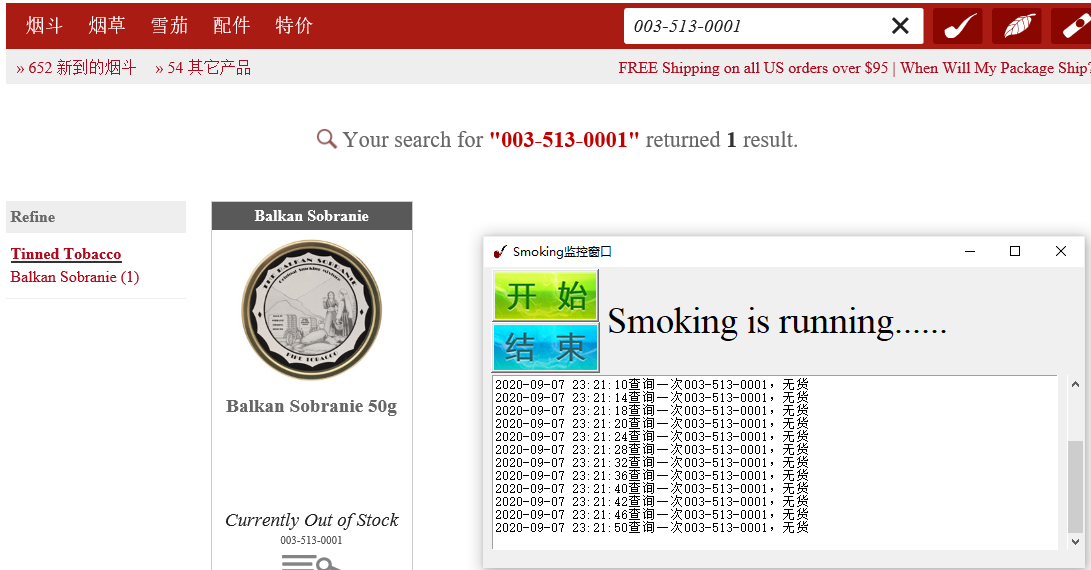
本例主要针对某一配置好的商品ID进行轮询,监控是否有货,有货则加入购物车,无货则继续轮询,如下图所示:
核心代码
本例最核心的代码,就是利用Selenium进行网站的模拟操作,如下所示:


  1 class Smoking:
  2     """定义Smoking类"""
  3
  4     # 浏览器驱动
  5     __driver: webdriver = None
  6     # 配置帮助类
  7     __cfg_info: dict = {}
  8     # 日志帮助类
  9     __log_helper: LogHelper = None
 10     # 主程序目录
 11     __work_path: str = ""
 12     # 是否正在运行
 13     __running: bool = False
 14     # 无货
 15     __no_stock = "Currently Out of Stock"
 16     # 线程等待秒数
 17     __wait_sec = 2
 18
 19     def __init__(self, work_path, cfg_info, log_helper: LogHelper):
 20         """初始化"""
 21         self.__cfg_info = cfg_info
 22         self.__log_helper = log_helper
 23         self.__work_path = work_path
 24         self.__wait_sec = int(cfg_info["wait_sec"])
 25         # 如果小于2,则等于2
 26         self.__wait_sec = (2 if self.__wait_sec < 2 else self.__wait_sec)
 27
 28     def checkIsExistsById(self, id):
 29         """通过ID判断是否存在"""
 30         try:
 31             i = 0
 32             while self.__running and i < 3:
 33                 if len(self.__driver.find_elements_by_id(id)) > 0:
 34                     break
 35                 else:
 36                     time.sleep(self.__wait_sec)
 37                     i = i + 1
 38             return len(self.__driver.find_elements_by_id(id)) > 0
 39         except BaseException as e:
 40             return False
 41
 42     def checkIsExistsByName(self, name):
 43         """通过名称判断是否存在"""
 44         try:
 45             i = 0
 46             while self.__running and i < 3:
 47                 if len(self.__driver.find_elements_by_name(name)) > 0:
 48                     break
 49                 else:
 50                     time.sleep(self.__wait_sec)
 51                     i = i + 1
 52             return len(self.__driver.find_elements_by_name(name)) > 0
 53         except BaseException as e:
 54             return False
 55
 56     def checkIsExistsByPath(self, path):
 57         """通过xpath判断是否存在"""
 58         try:
 59             i = 0
 60             while self.__running and i < 3:
 61                 if len(self.__driver.find_elements_by_xpath(path)) > 0:
 62                     break
 63                 else:
 64                     time.sleep(self.__wait_sec)
 65                     i = i + 1
 66             return len(self.__driver.find_elements_by_xpath(path)) > 0
 67         except BaseException as e:
 68             return False
 69
 70     def checkIsExistsByClass(self, cls):
 71         """通过class名称判断是否存在"""
 72         try:
 73             i = 0
 74             while self.__running and i < 3:
 75                 if len(self.__driver.find_elements_by_class_name(cls)) > 0:
 76                     break
 77                 else:
 78                     time.sleep(self.__wait_sec)
 79                     i = i + 1
 80             return len(self.__driver.find_elements_by_class_name(cls)) > 0
 81         except BaseException as e:
 82             return False
 83
 84     def checkIsExistsByLinkText(self, link_text):
 85         """判断LinkText是否存在"""
 86         try:
 87             i = 0
 88             while self.__running and i < 3:
 89                 if len(self.__driver.find_elements_by_link_text(link_text)) > 0:
 90                     break
 91                 else:
 92                     time.sleep(self.__wait_sec)
 93                     i = i + 1
 94             return len(self.__driver.find_elements_by_link_text(link_text)) > 0
 95         except BaseException as e:
 96             return False
 97
 98     def checkIsExistsByPartialLinkText(self, link_text):
 99         """判断包含LinkText是否存在"""
100         try:
101             i = 0
102             while self.__running and i < 3:
103                 if len(self.__driver.find_elements_by_partial_link_text(link_text)) > 0:
104                     break
105                 else:
106                     time.sleep(self.__wait_sec)
107                     i = i + 1
108             return len(self.__driver.find_elements_by_partial_link_text(link_text)) > 0
109         except BaseException as e:
110             return False
111
112     # def waiting(self, *locator):
113     #     """等待完成"""
114     #     # self.__driver.switch_to.window(self.__driver.window_handles[1])
115     #     Wait(self.__driver, 60).until(EC.visibility_of_element_located(locator))
116
117     def login(self, username, password):
118         """登录"""
119         # 5. 点击链接跳转到登录页面
120         self.__driver.find_element_by_link_text("账户登录").click()
121         # 6. 输入账号密码
122         # 判断是否加载完成
123         # self.waiting((By.ID, "email"))
124         if self.checkIsExistsById("email"):
125             self.__driver.find_element_by_id("email").send_keys(username)
126             self.__driver.find_element_by_id("password").send_keys(password)
127             # 7. 点击登录按钮
128             self.__driver.find_element_by_id("sign-in").click()
129
130     def working(self, item_id):
131         """工作状态"""
132         while self.__running:
133             try:
134                 # 正常获取信息
135                 if self.checkIsExistsById("string"):
136                     self.__driver.find_element_by_id("string").clear()
137                     self.__driver.find_element_by_id("string").send_keys(item_id)
138                     self.__driver.find_element_by_id("string").send_keys(Keys.ENTER)
139                 # 判断是否查询到商品
140                 xpath = "//div[@class="specialty-header search"]/div[@class="specialty-description"]/div["
141                         "@class="gt-450"]/span[2] "
142                 if self.checkIsExistsByPath(xpath):
143                     count = int(self.__driver.find_element_by_xpath(xpath).text)
144                     if count < 1:
145                         time.sleep(self.__wait_sec)
146                         self.__log_helper.put("没有查询到item id =" + item_id + "对应的信息")
147                         continue
148                 else:
149                     time.sleep(self.__wait_sec)
150                     self.__log_helper.put("没有查询到item id2 =" + item_id + "对应的信息")
151                     continue
152                 # 判断当前库存是否有货
153
154                 xpath1 = "//div[@class="product-list"]/div[@class="product"]/div[@class="price-and-detail"]/div["
155                          "@class="price"]/span[@class="noStock"] "
156                 if self.checkIsExistsByPath(xpath1):
157                     txt = self.__driver.find_element_by_xpath(xpath1).text
158                     if txt == self.__no_stock:
159                         # 当前无货
160                         time.sleep(self.__wait_sec)
161                         self.__log_helper.put("查询一次" + item_id + ",无货")
162                         continue
163
164                 # 链接path1
165                 xpath2 = "//div[@class="product-list"]/div[@class="product"]/div[@class="imgDiv"]/a"
166                 # 判断是否加载完毕
167                 # self.waiting((By.CLASS_NAME, "imgDiv"))
168                 if self.checkIsExistsByPath(xpath2):
169                     self.__driver.find_element_by_xpath(xpath2).click()
170                     time.sleep(self.__wait_sec)
171                     # 加入购物车
172                     if self.checkIsExistsByClass("add-to-cart"):
173                         self.__driver.find_element_by_class_name("add-to-cart").click()
174                         self.__log_helper.put("加入购物车成功,商品item-id:" + item_id)
175                         break
176                     else:
177                         self.__log_helper.put("未找到加入购物车按钮")
178                 else:
179                     self.__log_helper.put("没有查询到,可能是商品编码不对,或者已下架")
180             except BaseException as e:
181                 self.__log_helper.put(e)
182
183     def startRun(self):
184         """运行起来"""
185         try:
186             self.__running = True
187             url: str = self.__cfg_info["url"]
188             username = self.__cfg_info["username"]
189             password = self.__cfg_info["password"]
190             item_id = self.__cfg_info["item_id"]
191             if url is None or len(url) == 0 or username is None or len(username) == 0 or password is None or len(
192                     password) == 0 or item_id is None or len(item_id) == 0:
193                 self.__log_helper.put("配置信息不全,请检查config.cfg文件是否为空,然后再重启")
194                 return
195             if self.__driver is None:
196                 options = webdriver.IeOptions()
197                 options.add_argument("encoding=UTF-8")
198                 options.add_argument("Accept= text / css, * / *")
199                 options.add_argument("Accept - Language= zh - Hans - CN, zh - Hans;q = 0.5")
200                 options.add_argument("Accept - Encoding= gzip, deflate")
201                 options.add_argument("user-agent=Mozilla/5.0 (Windows NT 10.0; WOW64; Trident/7.0; rv:11.0) like Gecko")
202                 # 2. 定义浏览器驱动对象
203                 self.__driver = webdriver.Ie(executable_path=self.__work_path + r"IEDriverServer.exe", options=options)
204             self.run(url, username, password, item_id)
205         except BaseException as e:
206             self.__log_helper.put("运行过程中出错,请重新打开再试")
207
208     def run(self, url, username, password, item_id):
209         """运行起来"""
210         # 3. 访问网站
211         self.__driver.get(url)
212         # 4. 最大化窗口
213         self.__driver.maximize_window()
214         if self.checkIsExistsByLinkText("账户登录"):
215             # 判断是否登录:未登录
216             self.login(username, password)
217         if self.checkIsExistsByPartialLinkText("欢迎回来"):
218             # 判断是否登录:已登录
219             self.__log_helper.put("登录成功,下一步开始工作了")
220             self.working(item_id)
221         else:
222             self.__log_helper.put("登录失败,请设置账号密码")
223
224     def stop(self):
225         """停止"""
226         try:
227             self.__running = False
228             # 如果驱动不为空,则关闭
229             self.close_browser_nicely(self.__driver)
230             if self.__driver is not None:
231                 self.__driver.quit()
232                 # 关闭后切要为None,否则启动报错
233                 self.__driver = None
234         except BaseException as e:
235             print("Stop Failure")
236         finally:
237             self.__driver = None
238
239     def close_browser_nicely(self, browser):
240         try:
241             browser.execute_script("window.onunload=null; window.onbeforeunload=null")
242         except Exception as err:
243             print("Fail to execute_script:"window.onunload=null; window.onbeforeunload=null"")
244
245         socket.setdefaulttimeout(10)
246         try:
247             browser.quit()
248             print("Close browser and firefox by calling quit()")
249         except Exception as err:
250             print("Fail to quit from browser, error-type:%s, reason:%s" % (type(err), str(err)))
251         socket.setdefaulttimeout(30)
